1.6 Managing your Dataspace
There are a range of options presented to you on each provisioned dataspace environment within the platform. Below are some of the common functions available to you and how you can use them.
Starting/Stopping a dataspace
Selecting the start or stop button is like turning your home computer on and off. Your machine will shutdown, but your data will remain for next time you want to use it.
| Start a dataspace | Stop a dataspace |
|---|---|

|

|
Terminating (Deleting) a dataspace
Terminating your dataspace will shut down the machine and destroy all data stored on it’s drives.
| Terminate a dataspace |
|---|

|
Warning
Once a dataspace is terminated (deleted), the data can never be recovered. Ensure you have backed up your data and confirmed that it is accessible from your target destination before destroying your environment.
Updating your IP address whitelist
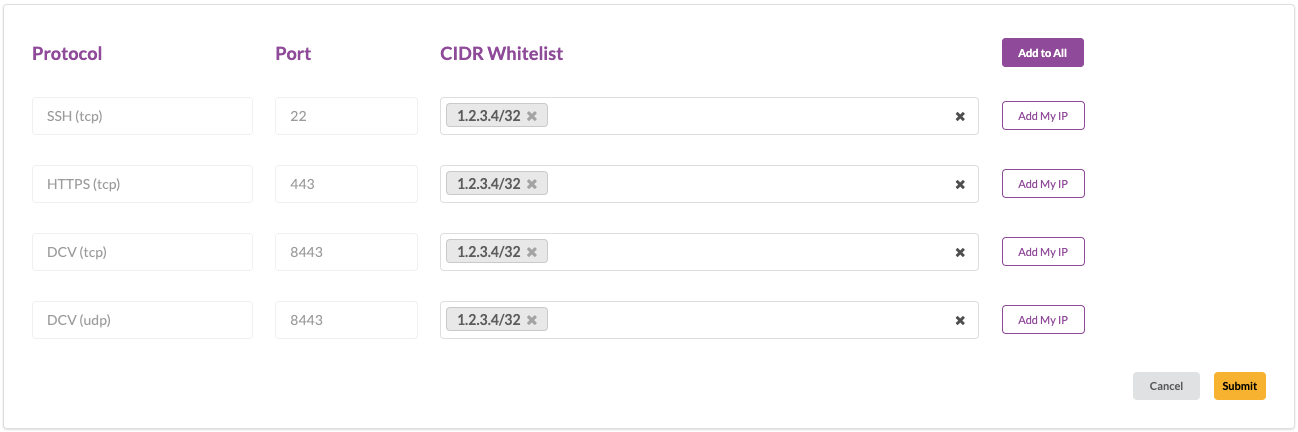
The ‘Edit Security Group’ function allows you to update the whitelist of IP addresses that can establish connections to your dataspace. In order to maintain security, you will need to update this when connecting from a new location. In the platform, these will appear as port numbers. You only need to update the ports you intend to use. The below table shows each port number and the associated protocol. For example, if you wish to establish a SSH connection, but created your machine while at home, you will need to add your new IP address (in the form of a CIDR) to port 22.
- You can select ‘Add My IP’ button to add your current IP to a specific protocol.
- You can select ‘Add to All’ to quickly add your current CIDR to all protocols.
- You can specify up to a ‘/16’ sized CIDR to add your entire company network for easy testing.
Select ‘Submit’ when you are happy with your changes.
| Modify your dataspace Security Group |
|---|

|
| Port | Protocol |
|---|---|
| 22 | SSH |
| 443 | HTTPS |
| 8443 | DCV (Supports TCP and UDP for improved latency) |
View dataspace cost by day
The ‘More Details & Cost’ view provides a user with an overview of a dataspace’s daily cost, as well as the technical details of your dataspace infrastructure useful for troubleshooting. This information should be provided to the support team upon request when seeking help.
| Modify your dataspace Security Group |
|---|

|
Dataspace Status
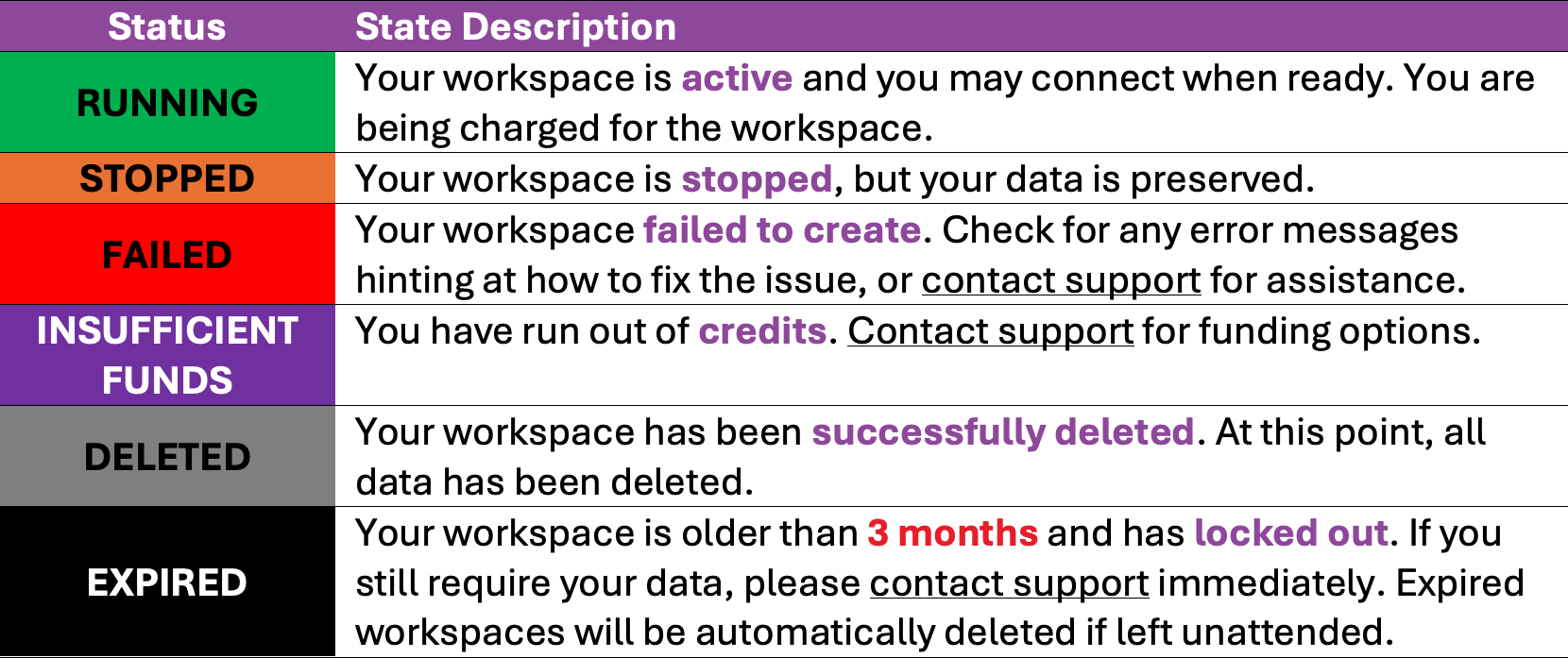
Each dataspace has a status. This tells you the current state of that dataspace. Refer to the table below for the meaning of the most common status’. If you have an unknown status, or need help understanding the state of your dataspace, please contact the team.